| Selector | Key properties |
|---|---|
.document-card | max-width: 320px; overflow: hidden; hover box-shadow |
.card-top-row | display: flex |
.card-thumbnail | width: 75%; flex-shrink: 0 |
.thumbnail-img | width/height: 100%; object-fit: cover |
.thumbnail-placeholder | height: 150px; centered text; background: #f0f0f0 |
.card-sidebar | flex column; gap: 0.25rem; padding: 0.4rem |
.card-buttons | flex row; gap: 0.25rem |
.card-bottom-content | flex row; padding: 0.3rem 0.5rem |
.tag-chip | font-size: 0.7rem; max-width: 7ch; ellipsis |
.doc-type-badge | uppercase; font-size: 0.65rem; font-weight: 700 |
.document-card.is-selected | border-left: 3px solid #3273dc |
Document Card Specification
Canonical reference for the document card component. Used by the live app, the demo server, and Claude when regenerating either.
Live Examples
These cards use the exact same CSS as the production app (copied from templates/base.html).
Annotated Breakdown
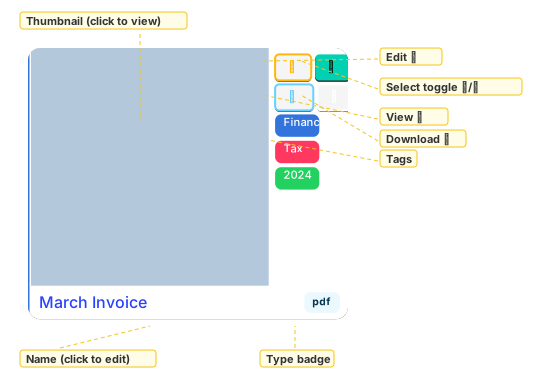
Card Structure
document_card.html
├── card-top-row (flex row)
│   ├── card-thumbnail (75% width)
│   │   └── Link to /document/view/{ULID}
│   │       ├── IF HasThumbnail → <img class="thumbnail-img">
│   │       └── ELSE → <div class="thumbnail-placeholder"> with DocumentType text
│   └── card-sidebar (flex column, 25% width)
│       ├── card-buttons row 1 (flex row)
│       │   ├── Edit button (✎) → /document/{ULID}/edit
│       │   └── Select toggle (☐/☑) → same page, toggles ULID in ?sel= param
│       ├── card-buttons row 2 (flex row)
│       │   └── Bulk Edit (⚙) → /documents/bulk-edit?ulids={selected or this doc}
│       └── Tag chips (loop over doc.Tags)
└── card-bottom-content (flex row)
    ├── Filename link (ellipsis overflow)
    └── Type badge (uppercase, is-info is-light)
CSS Rules
Defined in templates/base.html — the single source of truth for card styles.
Select Toggle Behaviour
- Unselected: outlined button (☐), link adds this ULID to
?sel=param - Selected: filled primary button (☑), link removes this ULID from
?sel=param - Card gets
is-selectedclass (blue left border) when selected - All other URL params (
view,page,show_hidden,q) preserved
URL scheme: /?view=flat&sel=AAAA,BBBB,CCCC — comma-separated ULIDs.
Bulk Edit button navigates to /documents/bulk-edit?ulids={selected_ulids}, or falls back to the single card's ULID if nothing is selected.
Template Variables
The card template (templates/partials/document_card.html) expects these variables per document:
| Variable | Type | Description |
|---|---|---|
doc.ULID | string | Document ULID for URLs |
doc.Name | string | Original filename for display |
doc.DocumentType | string | File extension (pdf, jpg, docx, ...) |
doc.HasThumbnail | bool | Whether to show image or placeholder |
doc.Tags | []Tag | Each has .Name and .Color |
doc.IsSelected | bool | Whether this card is in the selection set |
doc.SelectToggleURL | string | URL that toggles this ULID in/out of ?sel= |
selected_ulids | string | Page-level comma-separated selected ULIDs (for Bulk Edit link) |
Variant Checklist
The demo and this page should always show at least these three variants:
- Thumbnail + multiple tags + selected (blue left border, filled select button)
- Placeholder (no thumbnail) + single tag + unselected
- Thumbnail + no tags + unselected
Source Files
| File | Purpose |
|---|---|
templates/partials/document_card.html | Production card template (pongo2) |
templates/base.html | CSS source of truth for card styles |
templates/demo_card.html | Demo page template (extends base.html) |
cmd/demo/main.go | Demo server with mock data |
page_handlers.go | DocumentWithMeta struct, enrichDocumentsWithSelection, URL builders |
docs/document-card.html | This page (static, for GitHub Pages) |
Writing Annotations
Annotations are generated by cmd/annotate-card/main.go as native SVG elements. The pipeline:
- Demo server serves a plain card at
/card(template:demo_single_card.html) url2svgcaptures it as/tmp/godocs-card.svgcmd/annotate-cardwraps the captured SVG in a larger SVG with label rects, text, and dashed leader lines- Output:
docs/annotated-card.svg
To update annotations, edit the annotations slice in cmd/annotate-card/main.go, then run task demo:card:svg.
Label style
Pale yellow background (fill="#fffde7"), gold border (stroke="#f5c518"), bold 11px text.
Leader lines
Dashed lines: stroke="#f5c518" stroke-width="1" stroke-dasharray="4,3". Each runs from label edge to target element centre on the card.
Rebuilding the Demo
When the card design changes:
- Update
templates/partials/document_card.htmlandtemplates/base.html(CSS) - Update
templates/demo_single_card.htmlif the card structure changed - Update mock data in
cmd/demo/main.goif new fields were added - Update annotation positions in
cmd/annotate-card/main.goif layout shifted - Update this page — live examples, structure tree, CSS table, template variables
- Recapture SVGs:
task demo:card:svg(captures variants + annotated card)